Comparison · 2026
PhotoCraft vs Photoshop: an honest comparison
PhotoCraft is free, open source and runs on Linux, and it already covers everyday editing. It is still clearly behind Photoshop on AI features, plug-ins and stability.
Compared using PhotoCraft 0.7.0 (October 11, 2026) · Adobe Photoshop 2026
The short answer
If you mostly use layers, masks, colour adjustments and export, PhotoCraft can save you $275.88+ a year today. If your work depends on Generative Fill, third-party plug-ins or swapping PSDs with Photoshop users all day, stay with Photoshop for now.
- Feature breadth
- ~76%
- Ready for core-feature users
- ~61%
- Ready for pro daily work
- ~45%
From the project’s own assessment against Photoshop 2026 (2026-10-10, v0.6.0). Source
Feature by feature
Full supportPartialNot available
| Feature | PhotoCraft 0.7.0 | Photoshop 2026 |
|---|---|---|
| Cost and access | ||
| Price | Free | From $22.99/mo |
| Licence | MIT / Apache-2.0 | Proprietary |
| Account required | No | Adobe ID sign-in |
| Works offline | Fully | Needs periodic check-ins |
| Platforms | ||
| Windows | x64, ARM64, x86 | x64, ARM64 |
| macOS | Universal | Universal |
| Linux | AppImage, deb, rpm, Flatpak | Not available |
| In the browser | Self-hosted WebAssembly build | Photoshop on the web |
| Editing | ||
| Layers, groups, clipping masks | 27 blend modes | Full |
| Adjustment layers | 16, incl. Curves, Levels | Full |
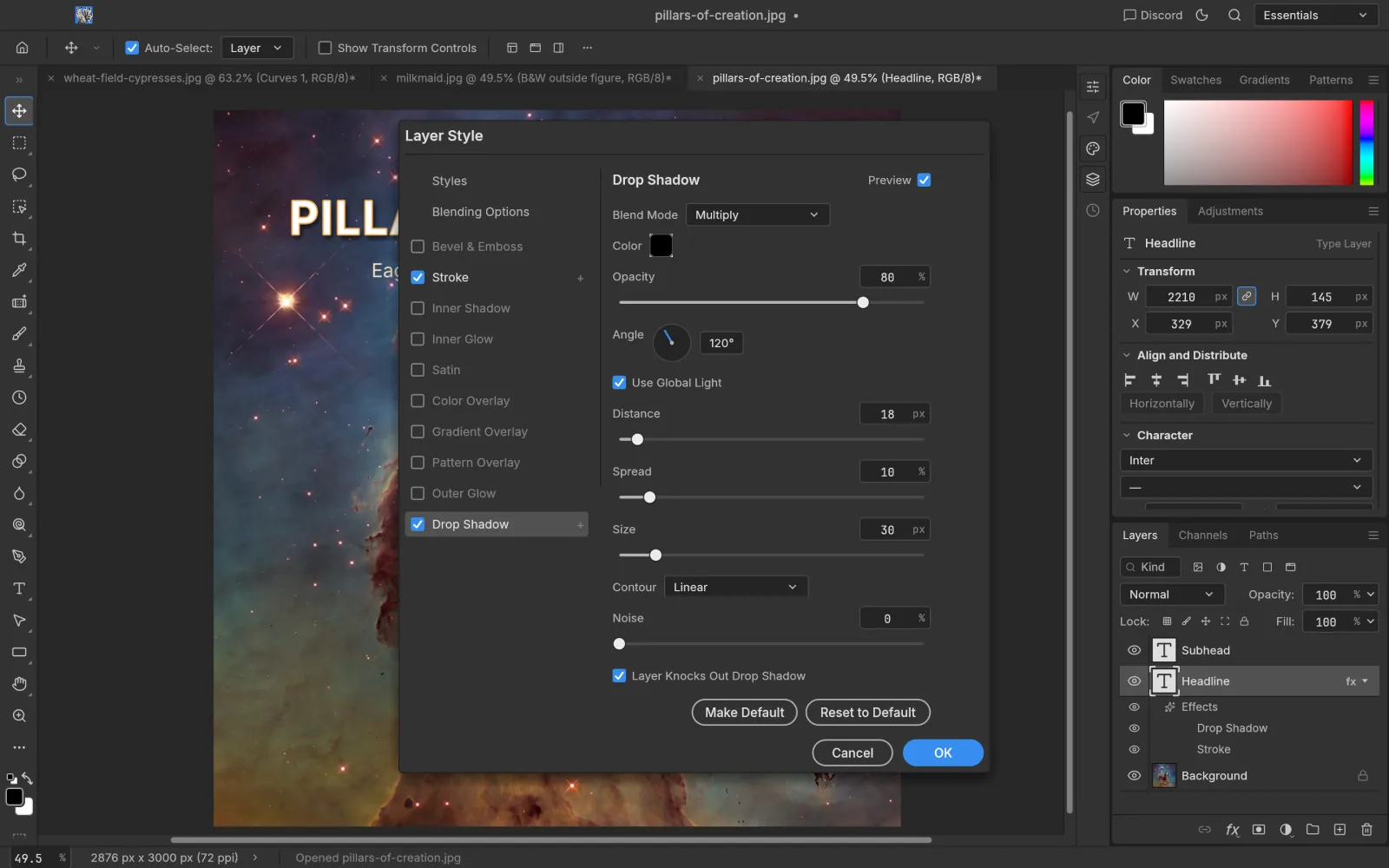
| Layer styles | Shadow, glow, bevel, stroke… | Full |
| Smart objects and smart filters | Present, re-render gaps | Full |
| Toolbox tools | 53 of 68 | 68 |
| Selections, Select Subject | On-device | Full |
| Type | No type on a path or manual kerning yet | Full |
| Brushes and pen pressure | Full engine; lag reported | Full |
| Filters | Every Filter menu item, live preview | Full |
| Files and colour | ||
| Open and save PSD / PSB | Yes; Photoshop sometimes refuses its files | Native |
| CMYK, Lab, 16/32-bit | All depths, every tool | Full |
| ICC colour management, soft proofing | Yes | Full |
| Other formats | No Photoshop PDF, EPS, JPEG XL or CR3 yet | Full |
| Camera Raw | Basic | Full |
| AI and extensions | ||
| Generative Fill / Expand | Not yet | Firefly, uses credits |
| Neural Filters, Sky Replacement | Not yet | Yes |
| Third-party plug-ins (.8BF) | Own WebAssembly plug-ins only | Large ecosystem |
| Actions and batch processing | Record/replay, CLI batch; no .atn import | Full |
| Driven by AI agents (CLI, MCP) | 500+ commands over MCP | Scripting via UXP |
| Maturity | ||
| Stability | Early alpha; freezes and GPU issues reported | Mature |
| Performance on big files | 3 of 25 speed targets met | Mature |
Price
PhotoCraft
Free forever, MIT / Apache-2.0
$0
Photoshop single app
About $275.88/year, annual plan billed monthly
$22.99/mo
Creative Cloud Pro
About $839.88/year, all Adobe apps
$69.99/mo
US list prices checked Oct 2026; prices vary by region. Source
Tips for switching from Photoshop
- Most shortcuts match (⌘J, ⌘T, ⇧⌘D and more), so you can start right away.
- Test with a copy of a PSD that doesn’t matter first, and check that layers, styles and type save correctly.
- Brushes and presets import from .abr, .grd, .pat, .aco, .ase and .cube; .atn action files don’t import yet.
- Report problems on GitHub Issues with your OS, image size and layer count.
Artworks shown: Vincent van Gogh, Wheat Field with Cypresses (1889, The Met, CC0); Johannes Vermeer, The Milkmaid (c. 1660, Rijksmuseum); Caspar David Friedrich, Wanderer above the Sea of Fog (c. 1817); The Blue Marble (NASA, 1972); Pillars of Creation (NASA, ESA, and the Hubble Heritage Team (STScI/AURA), 2014). All public domain. Screenshots: PhotoCraft 0.7.0, captured by ArtCraft AI Guide.