PhotoCraft online
Run the full PhotoCraft in your browser with nothing to install: layers, masks, type and real PSD files. Your images are processed on your own computer and never uploaded.
The first visit downloads about 16 MB. After that your browser caches it.
The web version is built for computer screens. On a phone its panels crowd together and it is hard to use. Try our lightweight online editor on your phone instead. Open the lightweight editor
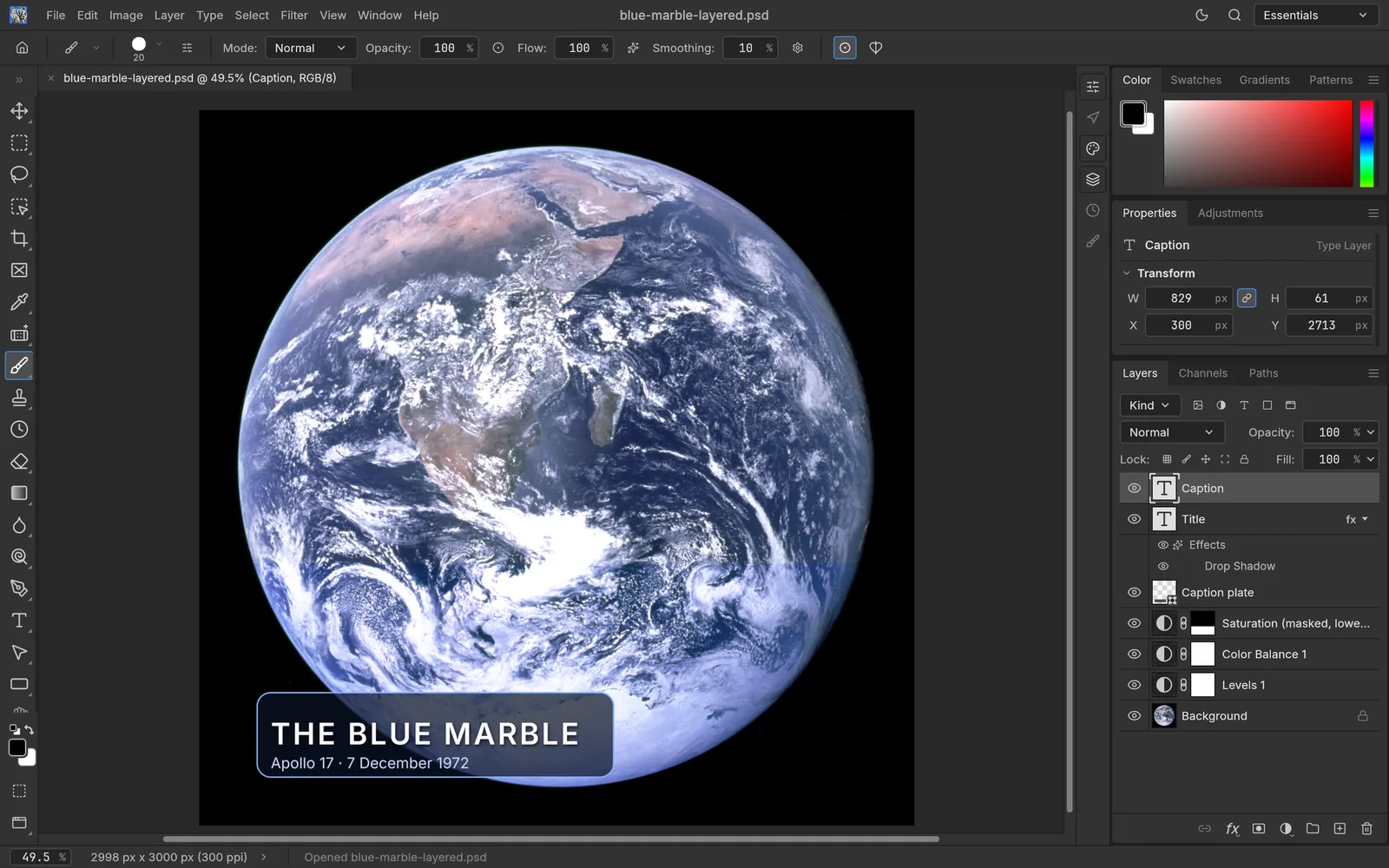
The PhotoCraft 0.11.1 web build in Chrome with a layered PSD: type layers, a drop shadow and masked adjustment layers stay editable.
What it does
- Open, edit and save layered PSD and PSB files
- Adjustment layers, layer masks and layer styles
- Editable type layers and vector shapes
- The Filter menu, selections, brushes, Clone Stamp and more
- Photoshop’s familiar menus and shortcuts
- Export to JPEG, PNG, WebP and other formats
What you need
- A recent desktop browser with WebGPU or WebGL2 (we tested Chrome)
- This site runs on HTTPS, so WebGPU and the clipboard work
- Plenty of memory: large, many-layered files use a lot of it
Good to know
- There is no autosave. Use File › Save to download your work before you close or reload the page.
- Only two fonts are built in, Inter and JetBrains Mono. The browser can’t read the fonts on your computer.
- Phones are not supported.
- We haven’t tested Firefox or Safari yet. If WebGPU misbehaves, add ?webgl to the address to use WebGL2.
Which one should I use?
| Lightweight online editor | PhotoCraft online | PhotoCraft desktop | |
|---|---|---|---|
| Install | No | No | Yes (free) |
| First load | About 20 KB | About 16 MB | 70–95 MB installer |
| Layers, masks, PSD | — | ✓ | ✓ |
| Works on phones | ✓ | — | — |
| Autosave and crash recovery | — | — | ✓ |
| System fonts | — | — | ✓ |
| CLI and MCP | — | — | ✓ |
Lightweight online editor · Download the desktop app · About PhotoCraft
Frequently asked questions
Is this the official version?
Yes. This is the official PhotoCraft 0.23.1 web build from the project’s GitHub release, unmodified and hosted on this site. Every build checks it against the release’s SHA256SUMS.txt, and it updates when PhotoCraft ships a new version.
Are my images uploaded?
PhotoCraft online runs entirely in your browser. Files you open are never uploaded; Save and Export download straight to your computer. Preferences stay in your browser. We only count one anonymous event: that the web version was opened.
Is my work kept when I close the page?
No. The web version has no autosave, so download your file with File › Save before closing or reloading. The desktop app has autosave.